B33motes
B33mote Specifications
Guidelines
- To make a B33mote you will need to use the provided B33mote Template file.
- If you add or remove anything extra to the template (meshes, groups/empties, bones) this could invalidate your file if you don't clean it up before exporting.
- You can make your own controllers/drivers to make animating easier, but you must make sure to remove them before export or your file will be invalid.
caution
It's ok to use any technique you might want when animating, but you NEED to clean and bake/convert it into keyframes before exporting. Otherwise, your file could be invalidated.
- If you change the name of anything in the template file, this will invalidate your file.
- If you change the hierarchy of anything, this will invalidate your file.
- If you move, rotate or scale anything other than the bones of the rig (as needed for animation), this will invalidate your file.
- The animation needs to be bound to the rig.
- We only allow 1 (ONE) animation per file
caution
If you have multiple animations (more than 1 action/clip/layer/etc.), we will only use the first one.
- Maximum animation length is 60s (1 min) of animation
caution
If your animation is longer than 1 minute, we will only use the first minute.
- We process at 24fps (frames per second) animation.
caution
If your animation is not 24fps, we will convert it to 24fps. This might cause your animation to be shorter or longer than expected.
- Emote animation can not exceed the bounds of a 5m cube from the origin.
| Restriction | Ideal | Max |
|---|---|---|
| Animations | - | 1 |
| Duration | - | 60s (1 min) |
Blender Export Tips
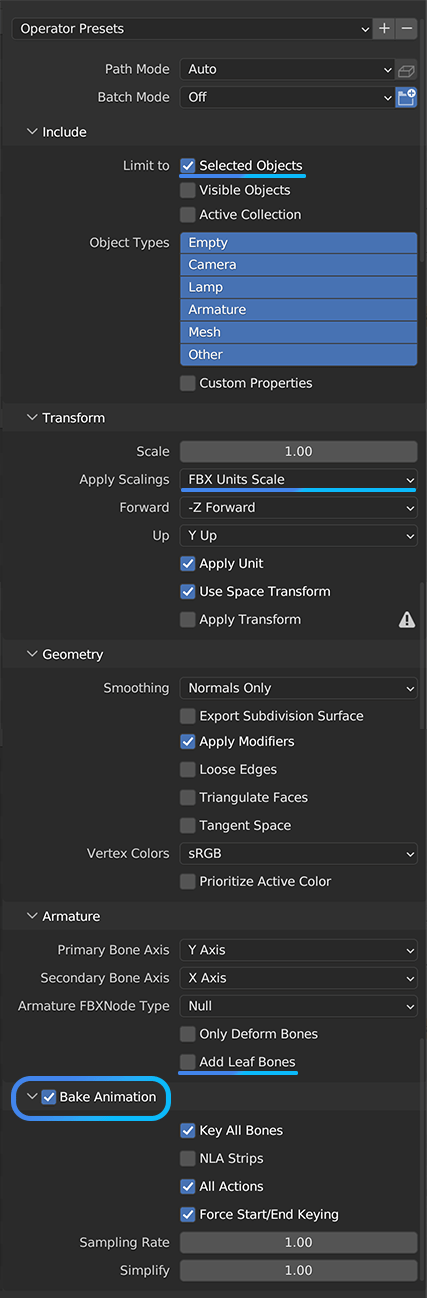
FBX
- Always export at first frame (usually frame 0)
- Export using
FBX Units Scale - Export baked animation
- Export without
leaf bones
Example Files
In order to create a new emote, you can use the following template: